> ## Documentation Index
> Fetch the complete documentation index at: https://docs.getmocha.com/llms.txt
> Use this file to discover all available pages before exploring further.
# Databases
> Your app comes with a database—understand dev vs prod and manage data
Every Mocha app ships with a database. Databases are used to store data for your app. Think of it as a spreadsheet for your app.
Use the Data tab to view tables, inspect rows, and make quick edits.
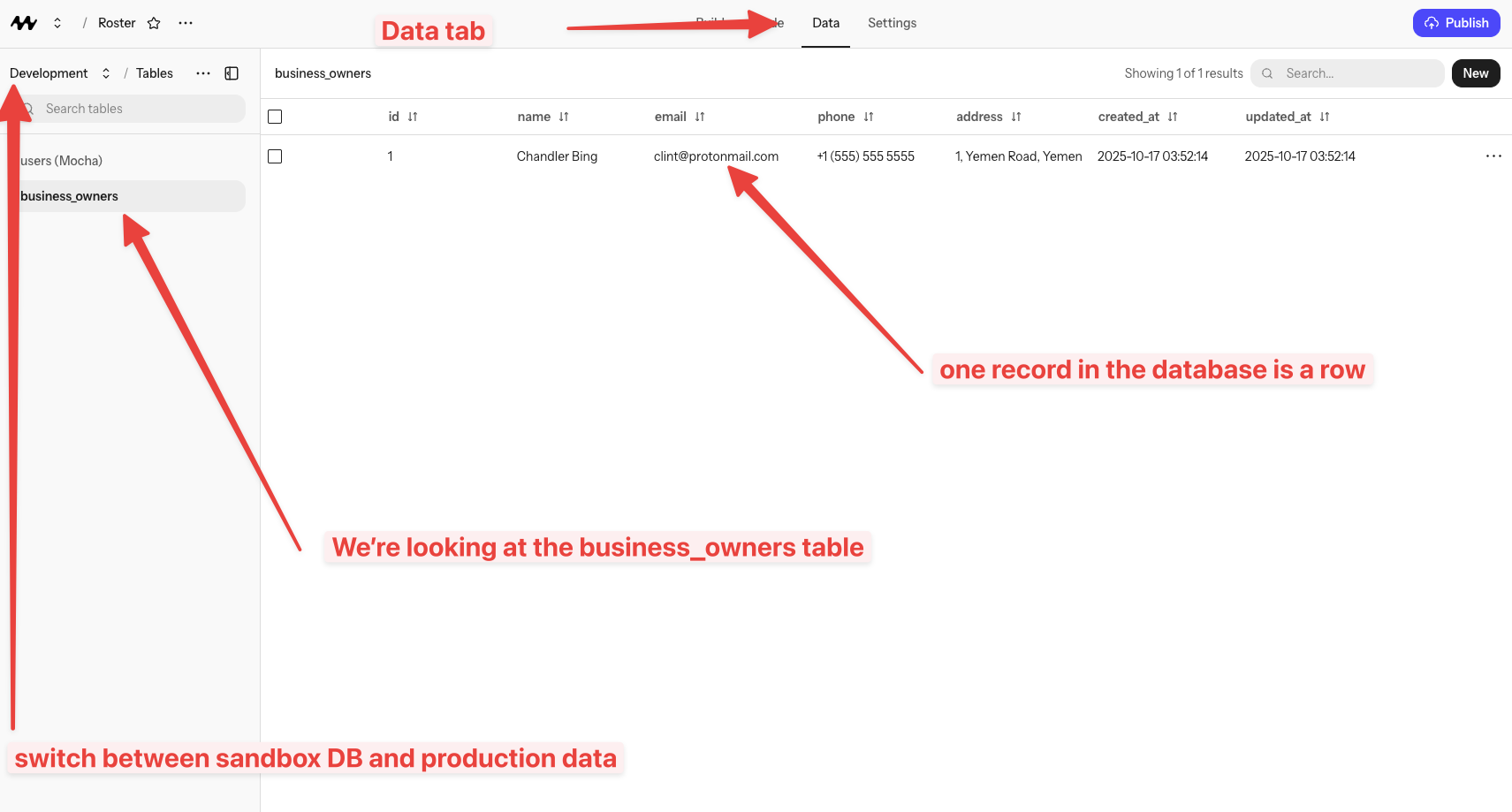 There are two databases per app: a **Dev** database for the in‑Mocha preview, and a **Prod** database for your deployed site. They do *not* share data.
## Dev vs Prod
* **Dev**: Used while building and testing in the preview. Safe to experiment.
* **Prod**: Used by your deployed site. Data here is what real users see.
When you click publish, Mocha runs any migrations that have been defined since the last deployment. This is how Mocha creates new tables. So for example if you introduce a new concept in your app (like "todos"), Mocha will create a new table for it. You'll see it in the Data tab immediately for Development, and after you deploy, it will be in the Production tab as well.
If you add data in Dev, you won’t see it in Prod after deploying. If you want to add data to your production database, explicitly ask Mocha to do so, or create an upload mechanism and then upload the data through the published site.
## Quick start
Open the Database tab to see your tables and recent rows.
Use the built‑in form UI to insert or edit rows. Great for testing quickly.
## What you can ask the AI to do
If you want to add data to your production database, explicitly ask Mocha to do so, or create an upload mechanism and then upload the data through the published site.
If you want to edit data in your production database, explicitly ask Mocha to do so, or create an edit mechanism and then edit the data through the published site.
***
## Data Ownership & Export FAQ
**Yes, absolutely.** You own everything you create with Mocha:
* The code generated for your app is yours
* The data stored in your database belongs to you
* You can download and export your project at any time
Mocha is a tool to help you build—we don't claim ownership over what you create.
Yes! You can download your entire project's source code at any time:
1. Click the app name in the header
2. Look for the "Download code" button
3. Your project will download as a zip file
The code is standard TypeScript/React, so you can review it, learn from it, or use it elsewhere.
Learn more about downloading your project in the [hosting guide](/basics/hosting#can-i-download-my-project%3F).
Yes, you can ask Mocha to add data export functionality to your app. For example, ask: "Add a button to export all users to CSV" and the AI will create the feature for you.
For direct database access, you can also view and manage your data through the Data tab in the Mocha interface.
Mocha uses **SQLite** as the database for your apps. SQLite is a reliable, widely-used database that works well for most web applications.
You don't need to configure or manage the database—Mocha handles all of that for you.
No, Mocha apps use the built-in SQLite database. You cannot connect to external databases like PostgreSQL, MySQL, or MongoDB.
This is by design—Mocha is built to work seamlessly without requiring you to set up and manage external services.
Mocha apps are hosted on **Cloudflare's** global infrastructure. This means your app benefits from:
* Fast loading times worldwide
* Automatic scaling
* Built-in security and DDoS protection
* High availability
You don't need to manage servers or worry about infrastructure.
No, you're not locked in. You can:
* Download your source code at any time
* Export your data through features you build
* Take your project elsewhere if needed
The code Mocha generates is standard web technology (TypeScript, React, SQLite) that can run in other environments with some setup.
While you can take your code, some Mocha-specific features (like the built-in auth integration) would require adaptation to work outside of Mocha's infrastructure.
There are two databases per app: a **Dev** database for the in‑Mocha preview, and a **Prod** database for your deployed site. They do *not* share data.
## Dev vs Prod
* **Dev**: Used while building and testing in the preview. Safe to experiment.
* **Prod**: Used by your deployed site. Data here is what real users see.
When you click publish, Mocha runs any migrations that have been defined since the last deployment. This is how Mocha creates new tables. So for example if you introduce a new concept in your app (like "todos"), Mocha will create a new table for it. You'll see it in the Data tab immediately for Development, and after you deploy, it will be in the Production tab as well.
If you add data in Dev, you won’t see it in Prod after deploying. If you want to add data to your production database, explicitly ask Mocha to do so, or create an upload mechanism and then upload the data through the published site.
## Quick start
Open the Database tab to see your tables and recent rows.
Use the built‑in form UI to insert or edit rows. Great for testing quickly.
## What you can ask the AI to do
If you want to add data to your production database, explicitly ask Mocha to do so, or create an upload mechanism and then upload the data through the published site.
If you want to edit data in your production database, explicitly ask Mocha to do so, or create an edit mechanism and then edit the data through the published site.
***
## Data Ownership & Export FAQ
**Yes, absolutely.** You own everything you create with Mocha:
* The code generated for your app is yours
* The data stored in your database belongs to you
* You can download and export your project at any time
Mocha is a tool to help you build—we don't claim ownership over what you create.
Yes! You can download your entire project's source code at any time:
1. Click the app name in the header
2. Look for the "Download code" button
3. Your project will download as a zip file
The code is standard TypeScript/React, so you can review it, learn from it, or use it elsewhere.
Learn more about downloading your project in the [hosting guide](/basics/hosting#can-i-download-my-project%3F).
Yes, you can ask Mocha to add data export functionality to your app. For example, ask: "Add a button to export all users to CSV" and the AI will create the feature for you.
For direct database access, you can also view and manage your data through the Data tab in the Mocha interface.
Mocha uses **SQLite** as the database for your apps. SQLite is a reliable, widely-used database that works well for most web applications.
You don't need to configure or manage the database—Mocha handles all of that for you.
No, Mocha apps use the built-in SQLite database. You cannot connect to external databases like PostgreSQL, MySQL, or MongoDB.
This is by design—Mocha is built to work seamlessly without requiring you to set up and manage external services.
Mocha apps are hosted on **Cloudflare's** global infrastructure. This means your app benefits from:
* Fast loading times worldwide
* Automatic scaling
* Built-in security and DDoS protection
* High availability
You don't need to manage servers or worry about infrastructure.
No, you're not locked in. You can:
* Download your source code at any time
* Export your data through features you build
* Take your project elsewhere if needed
The code Mocha generates is standard web technology (TypeScript, React, SQLite) that can run in other environments with some setup.
While you can take your code, some Mocha-specific features (like the built-in auth integration) would require adaptation to work outside of Mocha's infrastructure.