> ## Documentation Index
> Fetch the complete documentation index at: https://docs.getmocha.com/llms.txt
> Use this file to discover all available pages before exploring further.
# Duplicating Apps
> Create a copy of any Mocha app to experiment, remix, or start a new project from an existing one
You can duplicate any Mocha app to create an independent copy. This is useful when you want to experiment with a new direction, create a variation, or use an existing app as a starting point for something new.
## How to Duplicate
1. Click the dropdown arrow next to your app name in the top-left corner
2. Select **Duplicate**
3. A new copy of your app is created with all its pages, assets, and settings
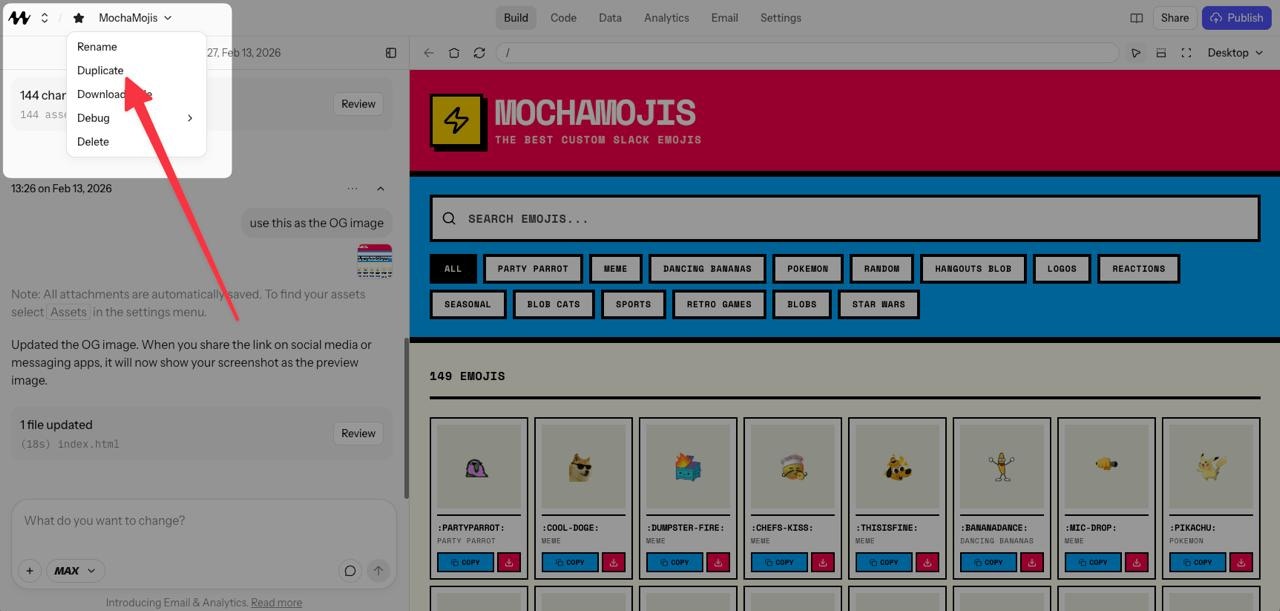 The duplicate is a fully independent project — changes to one won't affect the other.
## When to Use It
* **Experimenting**: Try a bold redesign without risking your current version
* **Remixing**: Use a working app as a template for a new project
* **Branching**: Maintain separate versions for different audiences or use cases
Duplicating an app copies pages, assets, and settings, but **does not** copy database contents or secrets. If your app relies on data stored in the [dev database](/basics/databases), you'll need to re-enter that data in the new copy.
You can also duplicate a specific **version** of your app from the [version history](/basics/versions). This lets you branch off from any point in your project's history.
The duplicate is a fully independent project — changes to one won't affect the other.
## When to Use It
* **Experimenting**: Try a bold redesign without risking your current version
* **Remixing**: Use a working app as a template for a new project
* **Branching**: Maintain separate versions for different audiences or use cases
Duplicating an app copies pages, assets, and settings, but **does not** copy database contents or secrets. If your app relies on data stored in the [dev database](/basics/databases), you'll need to re-enter that data in the new copy.
You can also duplicate a specific **version** of your app from the [version history](/basics/versions). This lets you branch off from any point in your project's history.