> ## Documentation Index
> Fetch the complete documentation index at: https://docs.getmocha.com/llms.txt
> Use this file to discover all available pages before exploring further.
# Deploy your website
> Information about hosting, deployment, and managing your Mocha projects
### Can I publish my app?
**Yes!**
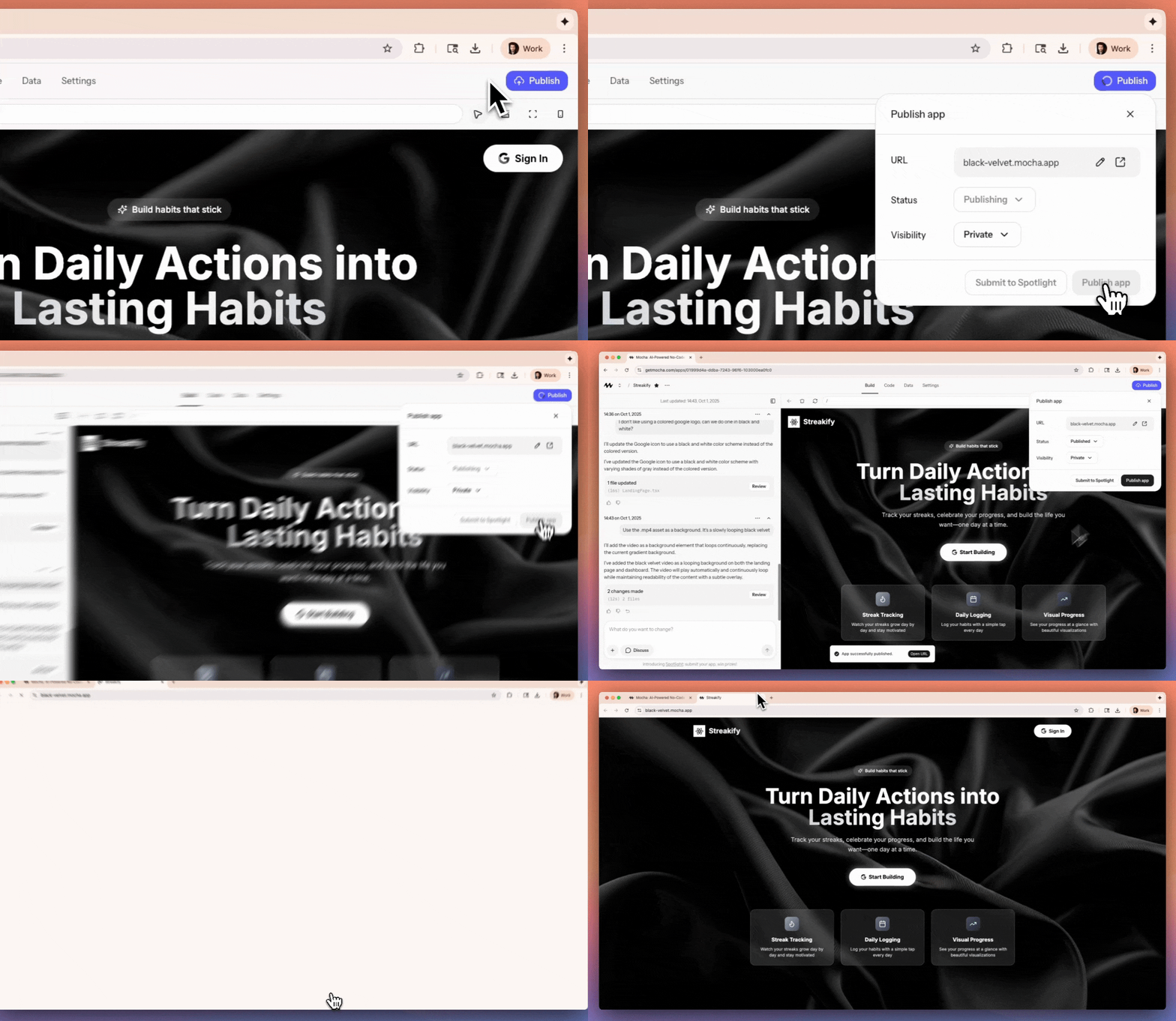
You can publish your app in one click directly in Mocha.
You do so by clicking the `Publish` button in the header.
if you're a bronze, silver or gold subscriber you can also pick an available subdomain, like [https://my-super-cool-website.mocha.app](https://my-super-cool-website.mocha.app).
 ### Can I publish my app to a custom domain?
Yes, see [custom domains](/basics/custom-domains).
### Can I use Vercel, Netlify or other platforms for hosting my app?
No, Mocha does not support publishing to external platforms. We support publishing to our own infrastructure only which is hosted on [Cloudflare](https://www.cloudflare.com).
Mocha enables people with no techincal knowledge to build and launch apps with as little friction as possible.
It's critical Mocha users can publish their app with a click of the button and without needing to create or manage accounts on external platforms.
The only way for us to provide this experience is by choosing a technical foundation for our apps, a platform to deploy it on, and hiding all those details from our users.
### How do I connect a GitHub repository in Mocha?
You cannot do this at this time. GitHub sync is something we're considering but haven't built yet.
### Can I download my project?
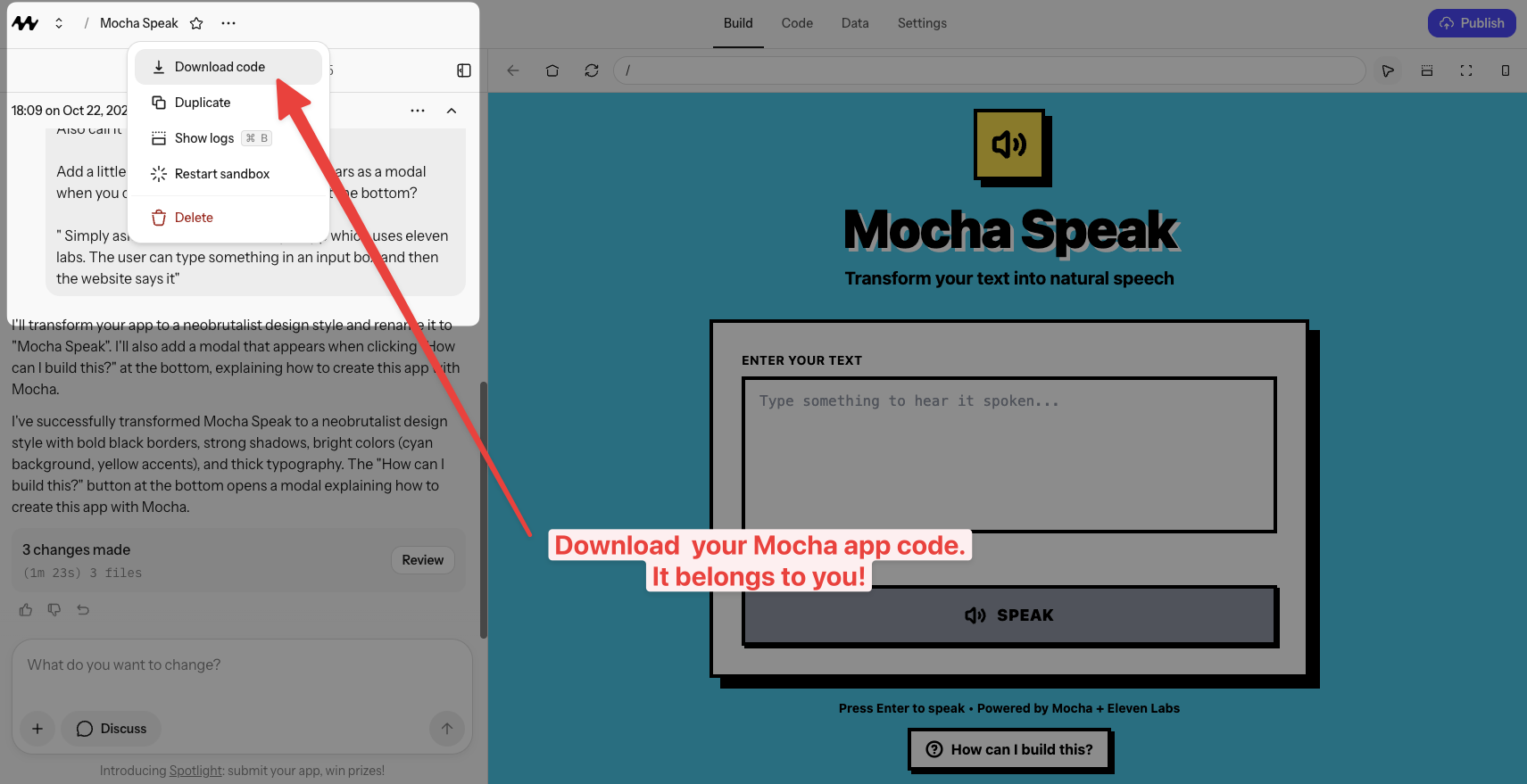
Yes, you can. Click the app name in the header, and you'll see a download code button.
### Can I publish my app to a custom domain?
Yes, see [custom domains](/basics/custom-domains).
### Can I use Vercel, Netlify or other platforms for hosting my app?
No, Mocha does not support publishing to external platforms. We support publishing to our own infrastructure only which is hosted on [Cloudflare](https://www.cloudflare.com).
Mocha enables people with no techincal knowledge to build and launch apps with as little friction as possible.
It's critical Mocha users can publish their app with a click of the button and without needing to create or manage accounts on external platforms.
The only way for us to provide this experience is by choosing a technical foundation for our apps, a platform to deploy it on, and hiding all those details from our users.
### How do I connect a GitHub repository in Mocha?
You cannot do this at this time. GitHub sync is something we're considering but haven't built yet.
### Can I download my project?
Yes, you can. Click the app name in the header, and you'll see a download code button.
 ### Can I undo / rollback changes or load a backup?
Yes! You can, see more in our [versions](/basics/versions) guide.
### Can I edit the code directly?
Yes! The Mocha application is a fully functioning editor. If you want to simply edit the code, you have to enter "dev mode" by clicking the code toggle on the top left:
Unless the file is marked as read-only (a few important files are set by Mocha and cannot be edited), you can edit the code directly.
When you finish typing, the file will automatically be saved. You can see the preview refresh in real-time, and if the refreshing doesn't work for some reason, use the preview restart menu with a quick restart ⚡.
### How can I edit only a specific section of code?
Simply ask it to modify the file with "filename.tsx". You can ask it to ONLY modify that file and it should comply. We have not yet implemented file locking, so this isn't guaranteed, but being insistent with the AI is an effective technique. See more in our [prompting guide](/guides/prompting).
***
## Mobile Apps FAQ
No, Mocha builds **web applications**, not native mobile apps. This means you cannot create `.apk` files (Android) or `.ipa` files (iOS) to publish to the Google Play Store or Apple App Store.
However, Mocha apps are **responsive** and work great on mobile devices through a web browser. Many successful businesses run entirely on web apps that users access via their phone's browser.
Yes! Mocha apps are built to be responsive, meaning they automatically adapt to different screen sizes. Your app will look good and work well on:
* Desktop computers
* Tablets
* Mobile phones
Users access your app through their web browser—no app store download required.
A **Progressive Web App (PWA)** is a web app that can be "installed" on a device and behaves more like a native app—it can have an icon on the home screen and work in a more app-like way.
Mocha doesn't currently have built-in PWA support, but you can ask the AI to add PWA features to your app. Results may vary depending on complexity.
Not directly. Mocha builds web apps, not native apps. To publish to app stores, you would typically need:
* A native app built with tools like React Native, Flutter, or Swift/Kotlin
* Or a PWA-to-native wrapper service (though these have limitations)
For most use cases, a responsive web app accessed through a browser works great and doesn't require app store approval or fees.
Mocha apps require an internet connection to work because they communicate with your database and backend. Basic offline functionality isn't built-in.
If offline support is critical for your use case, you can ask the AI to implement some caching, but full offline functionality is limited.
Web apps have several advantages:
* **Instant access** - Users don't need to download anything
* **No app store approval** - Launch and update whenever you want
* **Works everywhere** - One app works on all devices and platforms
* **Easier to maintain** - One codebase, not separate iOS and Android versions
* **Lower cost** - No Apple Developer ($99/year) or Google Play ($25) fees
Many successful products—from simple tools to complex SaaS platforms—are web apps rather than native mobile apps.
If you're building for mobile users, focus on making your web app responsive and fast. Most users are comfortable accessing web apps on their phones, and you avoid the complexity of app store publishing.
### Can I undo / rollback changes or load a backup?
Yes! You can, see more in our [versions](/basics/versions) guide.
### Can I edit the code directly?
Yes! The Mocha application is a fully functioning editor. If you want to simply edit the code, you have to enter "dev mode" by clicking the code toggle on the top left:
Unless the file is marked as read-only (a few important files are set by Mocha and cannot be edited), you can edit the code directly.
When you finish typing, the file will automatically be saved. You can see the preview refresh in real-time, and if the refreshing doesn't work for some reason, use the preview restart menu with a quick restart ⚡.
### How can I edit only a specific section of code?
Simply ask it to modify the file with "filename.tsx". You can ask it to ONLY modify that file and it should comply. We have not yet implemented file locking, so this isn't guaranteed, but being insistent with the AI is an effective technique. See more in our [prompting guide](/guides/prompting).
***
## Mobile Apps FAQ
No, Mocha builds **web applications**, not native mobile apps. This means you cannot create `.apk` files (Android) or `.ipa` files (iOS) to publish to the Google Play Store or Apple App Store.
However, Mocha apps are **responsive** and work great on mobile devices through a web browser. Many successful businesses run entirely on web apps that users access via their phone's browser.
Yes! Mocha apps are built to be responsive, meaning they automatically adapt to different screen sizes. Your app will look good and work well on:
* Desktop computers
* Tablets
* Mobile phones
Users access your app through their web browser—no app store download required.
A **Progressive Web App (PWA)** is a web app that can be "installed" on a device and behaves more like a native app—it can have an icon on the home screen and work in a more app-like way.
Mocha doesn't currently have built-in PWA support, but you can ask the AI to add PWA features to your app. Results may vary depending on complexity.
Not directly. Mocha builds web apps, not native apps. To publish to app stores, you would typically need:
* A native app built with tools like React Native, Flutter, or Swift/Kotlin
* Or a PWA-to-native wrapper service (though these have limitations)
For most use cases, a responsive web app accessed through a browser works great and doesn't require app store approval or fees.
Mocha apps require an internet connection to work because they communicate with your database and backend. Basic offline functionality isn't built-in.
If offline support is critical for your use case, you can ask the AI to implement some caching, but full offline functionality is limited.
Web apps have several advantages:
* **Instant access** - Users don't need to download anything
* **No app store approval** - Launch and update whenever you want
* **Works everywhere** - One app works on all devices and platforms
* **Easier to maintain** - One codebase, not separate iOS and Android versions
* **Lower cost** - No Apple Developer ($99/year) or Google Play ($25) fees
Many successful products—from simple tools to complex SaaS platforms—are web apps rather than native mobile apps.
If you're building for mobile users, focus on making your web app responsive and fast. Most users are comfortable accessing web apps on their phones, and you avoid the complexity of app store publishing.