> ## Documentation Index
> Fetch the complete documentation index at: https://docs.getmocha.com/llms.txt
> Use this file to discover all available pages before exploring further.
# Max Mode
> Unlock maximum intelligence with the best coding agent Mocha has to offer
## Overview
Max Mode gives you access to Claude's most powerful Opus family of models for handling your most complex development challenges.
Max Mode is "greedy" — it optimizes for maximum intelligence at the expense of speed and cost. When you're facing a difficult problem that requires sophisticated reasoning, Max Mode can help you get it right the first time.
Max Mode is available on all Mocha tiers, including Default.
## When to Use Max Mode
Max Mode shines when you're working on tasks that require deeper reasoning and more nuanced understanding:
### Complex Third-Party Integrations
APIs, webhooks, and services that require careful coordination and error handling.
### Sophisticated UI/UX Designs
Nuanced layouts, animations, and interactions that need thoughtful implementation.
### Advanced Business Logic
Role-based access control, multi-step workflows, and complex state management.
### Challenging Debugging
Tricky bugs that require understanding multiple parts of your codebase at once.
### Quality Over Speed
If you prioritize the highest quality output and aren't sensitive to credit cost, Max Mode delivers the best results Mocha can offer.
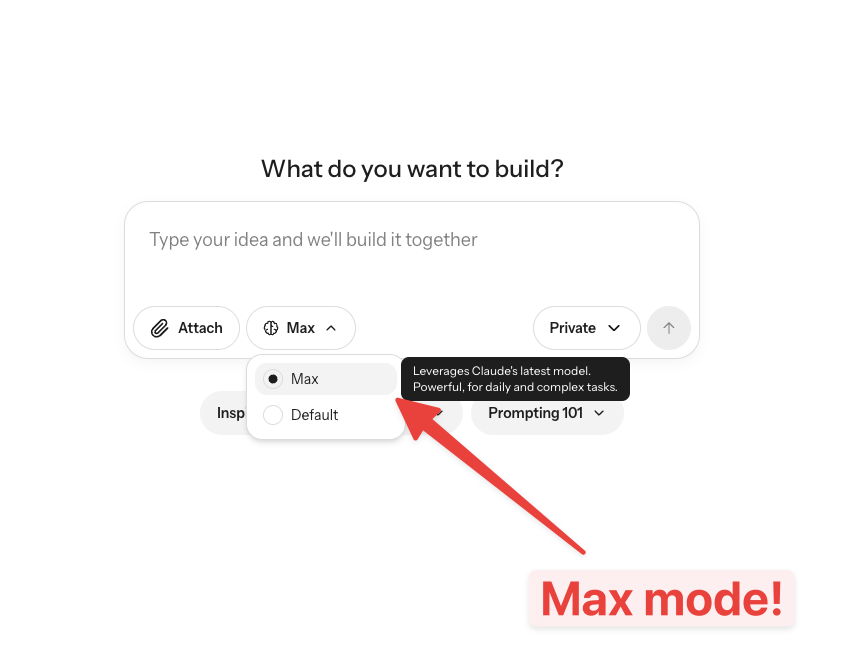
## How to Enable
Find the dropdown menu next to the chat input field
Choose "Max Mode" from the available options
Send your prompt and let the most powerful model tackle your challenge
 ## Credits & Cost
Max Mode uses more credits per request than the default mode — typically 20% to 200% more depending on the complexity of your request.
However, Max Mode can actually save you credits on complex tasks:
* **Fewer iterations**: Better reasoning means getting things right the first time
* **Less debugging**: More intelligent code generation leads to fewer bugs
* **More reusable code**: Higher quality output that you won't need to rewrite
Switching between Max Mode and default mode during a session resets Mocha's caching system. For the most economical usage, try to stay consistent with one mode throughout a session.
## Best Practices
1. **Start with default mode** for routine tasks and simple modifications
2. **Switch to Max Mode** when you hit a wall or need sophisticated reasoning
3. **Stay consistent** within a session to preserve caching benefits
4. **Be specific** in your prompts — Max Mode excels when given detailed context about complex requirements
## Credits & Cost
Max Mode uses more credits per request than the default mode — typically 20% to 200% more depending on the complexity of your request.
However, Max Mode can actually save you credits on complex tasks:
* **Fewer iterations**: Better reasoning means getting things right the first time
* **Less debugging**: More intelligent code generation leads to fewer bugs
* **More reusable code**: Higher quality output that you won't need to rewrite
Switching between Max Mode and default mode during a session resets Mocha's caching system. For the most economical usage, try to stay consistent with one mode throughout a session.
## Best Practices
1. **Start with default mode** for routine tasks and simple modifications
2. **Switch to Max Mode** when you hit a wall or need sophisticated reasoning
3. **Stay consistent** within a session to preserve caching benefits
4. **Be specific** in your prompts — Max Mode excels when given detailed context about complex requirements